Pull the plug.Your AI keeps working.

PocketCore X is a personal AI that runs on your own computer or USB stick and never needs the internet. What you write, your documents and your photos never leave your device. Pay once, no subscription.

  • 6 languages
  • Windows · macOS · Linux
  • Up to 3 computers
  • One-time payment
  • Always updated
  • No account needed

Your language, a familiar screen.

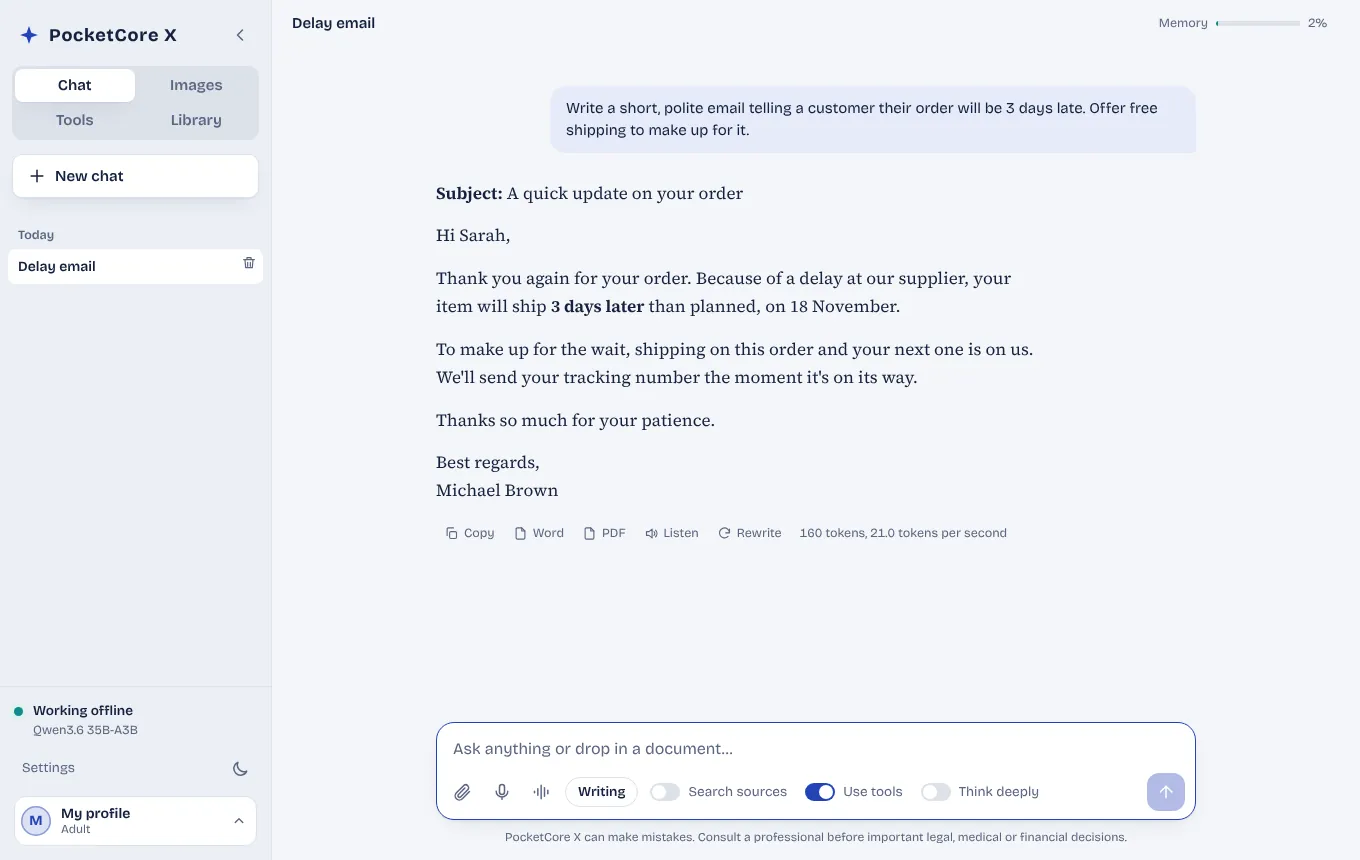
The interface comes in Turkish, English, Russian, German, Spanish and French. Switch with one click, and the model talks to you in that language too. These are real screens from the app.

PocketCore X chat drafting a delay email to a customer (English)

Turn on what you need. Skip the rest.

PocketCore X installs piece by piece. Tick a capability in Settings › Components and download it; after that, everything runs offline.

Sizes depend on the model you choose. You don’t have to install everything.
Components10

Chat and writing

Answers, emails, summaries, letters, novels and scripts — in 6 languages.

2–22 GB

Talk to your documents

Searches your PDFs and Word files by meaning and shows which page each answer came from.

1.3 GB

Create and edit images

Turns words into pictures; removes objects, changes backgrounds and colours, upscales photos.

4–7 GB

Voice conversations

Ask out loud and hear a natural voice reply. Turns meeting recordings into text.

0.7 GB

Translation

Translates documents and text between 6 languages without breaking the layout.

1–4 GB

Photo to data

Turns receipts, invoices and business cards into tables, and scanned pages into text.

0.1–1.4 GB

Offline maps

Your country’s map, address search and directions — even with no signal.

1–3 GB

Library

Wikipedia, dictionary, medical encyclopedia, Stack Overflow and preparedness guides, with sources.

0.1–50 GB

Coding

Software mode switches to a model trained for code: writes, explains and debugs.

8–47 GB

Study tools

Builds flashcards, practice exams and summaries from your notes.

included

Who is it for? A few realistic days.

The best way to explain PocketCore X is to show how it fits into an ordinary day.

Lawyer

The client’s file never leaves the laptop

Emma has a 140-page tenancy dispute on her desk. She drags the file into “My documents” and asks: “When was the notice to vacate signed, and where is the other side’s objection?” The answer comes back with page numbers. She drafts the reply in Legal mode and checks the relevant article in the legislation library. Not a single detail about her client goes to a server, so privilege stays intact.

  • My documents
  • Legal mode
  • Legislation library
Shop owner

Half an hour back at closing time

At Michael’s furniture workshop, every day ends with a pile of receipts and invoices. He snaps them on his phone, drops the photos onto the computer and PocketCore X turns them into one table. An email from a customer in Spain gets translated; he writes his answer in English and sends it in Spanish. There’s a polite draft ready for orders that will ship late. No subscription — he bought it once and uses it every evening.

  • Photo to data
  • Writing mode
  • Translation
Student

Studying continues when the dorm Wi-Fi doesn’t

Sophie is revising for her finals, and the dorm internet drops every evening. She uploads a photo of her lecture notes; PocketCore X turns it into 20 flashcards and a 10-question practice test. When a topic doesn’t click, it explains it from Wikipedia, with the source. It all lives on a USB stick, so she plugs it into a library computer and carries on where she stopped.

  • Exam prep mode
  • Flashcards
  • Wikipedia
Family

A profile for everyone, a safe tutor for the kids

The Millers share one computer but have four profiles. Mum writes work emails, Dad asks about the garden, and nine-year-old Leo learns fractions with pizza examples in PIN-protected kids mode. He asks out loud and listens to the answer. Kids mode talks at his level and stays away from anything unsuitable. Nobody can see anyone else’s chats.

  • Family profiles
  • PIN-protected kids mode
  • Voice chat
Writer

A novel’s first draft, cover included

James works days and writes crime fiction at night. When a scene comes to him on a walk, he dictates it straight into PocketCore X. The creative writing model keeps his characters consistent, debates where to hide the clues and doesn’t flinch from a dark scene. He sketches the cover in the same app. His drafts sit on his own disk, not on anyone’s server.

  • Creative writing models
  • Image creation
  • Dictation
Prepper

A 128 GB stick in the emergency bag

Next to the water and the torch, Anna keeps a USB stick in her emergency bag. It holds an offline map of the country, first-aid and field medicine manuals, disaster preparedness guides and a small chat model. If the networks ever go down, she can plug it into any laptop and ask, “How do I cool a burn? Which road gets me to the nearest hospital?” Hopefully she’ll never need it. But it’s there.

  • Offline maps
  • First-aid manuals
  • Preparedness guides

These stories are example scenarios showing how PocketCore X can be used; the people are illustrative.
What’s inside?

The complete list of everything you can install today. All of it is included in your licence; you pick what to install.

Chat and writing models

1.9–44 GB

One is picked automatically for your computer’s memory; switch any time. All of them can read photos and document pages.

  • Qwen3.5 2B (Mini)
  • Qwen3.5 4B (Light)
  • Qwen3.5 9B (Balanced)
  • Gemma 4 12B
  • Gemma 4 26B
  • gpt-oss 20B
  • Qwen3.8 27B
  • Qwen3.6 35B (Strong)
  • Qwen3.5 122B (Pro)
  • Creative writing models for fiction and scripts (Mini, 12B, 27B and large)

Coding models

8–48 GB

Switch to Software mode and a model trained for code takes over on its own.

  • Ornith 1.0 35B (recommended)
  • Ornith 1.5 122B (Pro)
  • Qwen3 Coder Next (Pro)
  • North Mini Code
  • Mellum 2.1 12B (light)

Image creation and editing

4–7 GB

Turns your words into pictures and edits existing images from a description.

  • Z-Image-Turbo image model
  • FLUX.2 klein 4B image model
  • Classic SDXL image model
  • Edit by description: add or remove objects, change colours and clothing, apply a style
  • One-click background removal
  • Upscaling (Real-ESRGAN, 4×)
  • Image gallery

Voice

0.1–0.7 GB

Dictate, listen to answers, transcribe recordings.

  • Speech to text: Whisper Turbo and Whisper Small
  • Natural reading voice: Supertonic
  • Premium English voice: Kokoro
  • Piper voices: English (US and UK), Russian, German, Spanish (2 voices), French
  • Meeting and audio transcription

Translation, text recognition, search

0.1–4.4 GB

Pulls text from scans, receipts and photos; translates documents; searches your files by meaning.

  • Translation model: fast and high quality (Hy-MT2)
  • Text recognition: Turkish, English, Russian, German, Spanish, French
  • Receipt and invoice reader (GLM-OCR)
  • Photo to data: receipts, invoices, business cards, tables, notes and whiteboards
  • Semantic search: finds things in your documents by meaning and shows the source page

Maps

1–3 GB

No internet or signal needed.

  • Offline country map (OpenStreetMap)
  • Address and place search
  • Directions by car, on foot, by bike

Library

0.1–50 GB

The model checks these sources when it answers and cites them. You can also browse them like a website.

  • Wikipedia (full, no images, summary)
  • Wiktionary
  • Wikibooks
  • Wikisource
  • Wikiquote
  • Wikivoyage travel guide
  • Project Gutenberg books
  • Stack Overflow
  • Q&A archives: cooking, home repair, gardening, travel, computer help, car maintenance, personal finance, parenting, writing, academia, expat life, English learning, law

Health

For general information; not a substitute for a doctor.

  • WikiMed medical encyclopedia
  • MDWiki medical encyclopedia
  • Drug labels: openFDA
  • Travel health: CDC
  • Medical sciences Q&A

Law and legislation

Compiled from official texts.

  • Turkish legislation
  • Turkish Constitutional Court decisions
  • German federal law
  • French codes (Légifrance)
  • Spanish legislation (BOE)
  • Russian Federation codes
  • EU law (EUR-Lex)

Emergency and preparedness

For the days without internet.

  • Field medicine manuals
  • Survival manuals (selection and full archive)
  • Disaster preparedness: Ready.gov (English and Spanish)
  • Appropedia: appropriate technology
  • Outdoors, sustainable living and amateur radio Q&A

Education

For students and teachers.

  • PhET science simulations
  • Wikiversity
  • Flashcards, summaries and practice tests from your notes
  • Exam formats: SAT, GCSE, A-level, IELTS, Abitur, Bac, EBAU, ЕГЭ, ОГЭ, YKS, KPSS, LGS, ALES, YDS

12 work modes

Each mode has its own instructions and the best-suited model.

  • General
  • Writing
  • Software
  • Engineering
  • Legal
  • Health
  • Learning
  • Exam prep
  • Academic
  • Languages
  • Creative
  • Kids

Tools and everyday use

The pieces that speed up daily work.

  • My documents: ask questions across many PDF and Word files at once
  • Ready-made templates: letters, notices, rental and employment contracts, NDA, CV, quotes and more
  • Calculators: interest, VAT / sales tax
  • Family profiles and encrypted profiles
  • PIN-protected kids mode
  • Use it from your phone (same network)
  • NVIDIA graphics acceleration
  • Interface in 6 languages: Turkish, English, Russian, German, Spanish, French

The list grows with every update. Most models work in all 6 languages; library content is multilingual unless a language is noted.

PocketCore X keeps getting updated.

AI moves forward every month, and PocketCore X moves with it. You buy it once; the improvements keep coming.

New models get added

When a better open model comes out, we test it and add it to the components list. Open the Components window and install it in one click.

The app updates itself

New features and fixes arrive inside the app. Updates are digitally signed, so only packages from us get installed.

Downloads keep working

If a model’s download address changes, we fix it centrally and the installer follows the new address on its own.

No extra charge

Updates and new components are included in your licence. No subscription, no renewal fee.

How big is your drive, and what fits on it?

Pick the size of your USB stick or drive and how much memory your computer has, and see what PocketCore X can carry for you.

Drive / USB size
Computer memory (RAM)

A 128 GB drive fits 17 parts: AI plus 113 GB of content and tools.

113 GB used · 5.5 GB left free

  • Chat model for your computer — Fits6.3 GB
  • Voice chat and transcription — Fits0.7 GB
  • Translation model — Fits1.1 GB
  • Text recognition and receipt reader — Fits1.4 GB
  • Search your documents by meaning — Fits1.3 GB
  • Offline country map — Fits2 GB
  • First-aid and preparedness guides — Fits3.3 GB
  • Health library — Fits3.9 GB
  • Image creation and editing — Fits7.2 GB
  • Legislation and law library — Fits6.9 GB
  • Science simulations and Wikiversity — Fits1.6 GB
  • Stack Overflow — Fits2.6 GB
  • Q&A archives (cooking, repairs, gardening…) — Fits9 GB
  • Wikipedia (summary) — Fits13 GB
  • Coding model — Fits8.4 GB
  • Wiktionary — Fits14 GB
  • Books: Gutenberg, Wikibooks, Wikisource — Fits30 GB
  • Full Wikipedia — Doesn’t fit50 GB
  • Extra chat models (Gemma, gpt-oss, Qwen) — Doesn’t fit18 GB

Sizes are approximate, and a drive’s usable space is a little less than its label. You can always change your choices later.

Buy once, use it for years.

The AI models inside PocketCore X are openly licensed and run on your own drive. However much you use them, you don’t pay anything more.

No message limits

One question a day or a thousand, it’s the same. No credits, no quotas, no “try again tomorrow”.

No price rises

Your licence is yours. Whatever happens to exchange rates or subscription prices, your AI costs what you already paid.

No shutdown worries

If a cloud service closes or locks your account, everything goes with it. PocketCore X sits on your drive and works without internet.

New tools included

Libraries, maps, translation, voice, images… Newly added components and updates are part of your licence.

Compare with a subscription

Total subscription
₺36,000
PocketCore X, one-time
₺1,499
You keep
₺34,501

Based on the monthly amount you enter; exchange rates and price rises are not included.

Why offline?

Your questions stay yours.

Medical reports, client files, company contracts — none of it is sent to a server, read by anyone or used as training data.

No subscription.

Pay once. No monthly fee, no credits, no quotas, no “you’ve reached today’s limit”.

Works anywhere.

On a plane, on a building site, in the countryside, during an outage. Copy the folder to a USB stick and open it on another computer.

Made for families.

A separate profile for everyone; kids mode is PIN-protected and answers at their level.

Ready in three steps

  1. 1

    Download

    Right after payment your download link and licence key appear on screen and arrive by email.

  2. 2

    Activate

    Open the app and enter your licence key. This needs the internet once and takes a few seconds.

  3. 3

    Pick components

    The setup wizard suggests the best model for your computer; tick what you want and install.

Will it run on my computer?

PocketCore X checks your memory and picks a suitable model by itself. A graphics card is optional; with one it runs faster.

Memory (RAM)Suggested modelGood for
8 GBLightEveryday writing, summaries, Q&A; reads photos
16 GBBalancedDeeper answers, working with documents
32 GB or moreStrongLong documents, hard questions, code
64 GB or moreProThe most capable model in the package

Windows 10/11, macOS (Apple Silicon and Intel) and 64-bit Linux. Disk space: 10–200 GB depending on the components you install.

Pay once. Keep it.

₺1,499

lifetime licence · one-time payment, VAT included

  • Lifetime licence that never expires
  • Use on 3 computers
  • Copy freely to a USB stick or another drive
  • Every component and language
  • All updates and newly added components, at no extra cost
  • Email support
Buy nowPayments are processed securely by PayTR with 3D Secure.

Questions

Does it really need no internet?

Only twice: when you first activate the licence and when you download components. After that you can unplug.

Is it as good as ChatGPT?

Cloud models run on huge servers; PocketCore X runs on your computer. It does very well at everyday writing, documents, translation and research; the strongest models need a powerful computer.

Can I move it to another computer?

Yes. Copy the folder to any drive or USB stick. The licence covers 3 computers, and you can reset an old one yourself from the app.

Will it get updates?

Yes. PocketCore X is updated continuously: new models, features and fixes arrive inside the app, all included in your licence.

Does it run on a Mac?

Yes, on Apple Silicon and Intel Macs. Image generation is available on Apple Silicon Macs only.

Can I get a refund?

Digital content is delivered instantly, so under consumer law there is no right of withdrawal. If you hit a technical problem, write to us and we’ll fix it.

Can I get an invoice?

Yes. After ordering, send your billing details to info@doramedya.com.